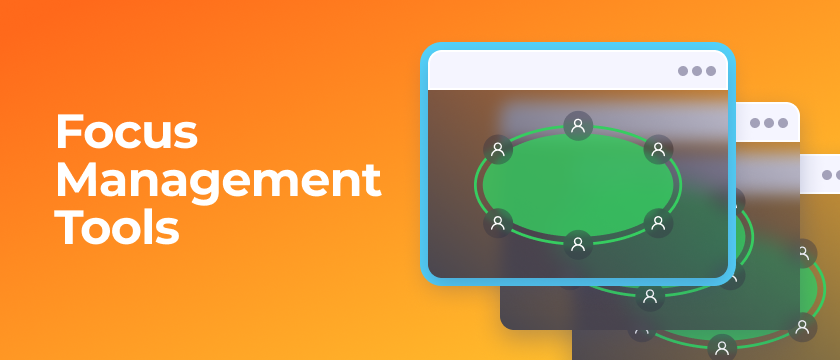
In online poker, focus management is the skill that lets you follow the action across every table, process what matters, and act on time. The higher your table count, the harder it gets, so the goal is simple: spend your attention only where hero requires action, and let the software handle the rest.
Jurojin gives you a full toolkit to isolate your focus, navigate your tables without friction, and never miss an urgent decision. Below we cover the habits worth keeping and, more importantly, the Jurojin features that do the heavy lifting for you.
👉Focus management is not only willpower, it's the right setup. The less you have to hunt for the table that needs you, the more brainpower you keep for actual decisions.
Good Focus Habits (the Short Version)
A handful of habits go a long way to protect your concentration during a session. You don't need a long lecture, just keep these in mind:
- Put your phone away — silence notifications or go Airplane Mode. The dopamine hits are not worth the leak.
- Take structured breaks — the Pomodoro technique (short focused blocks with breaks) keeps you sharp late in a session.
- Clean your space — no TV or noise in the background, one room where nobody interrupts you.
- Find your table-count sweet spot — more tables means more hands, but past a threshold your BB/100 drops. Master multi-tabling before adding volume.
- Take notes — short, actionable reads on player tendencies you can actually use mid-session.
Focus Management Tools in Jurojin
This is where Jurojin does the work for you. These features are designed to keep your attention on the right table at the right moment, whether you play stacked on a laptop or tiled across multiple monitors.
We'll start with the tools that help you navigate your tables and always know where the focus is, and then move on to the features that take over when it's your turn to act, so your attention goes exactly where it's needed.
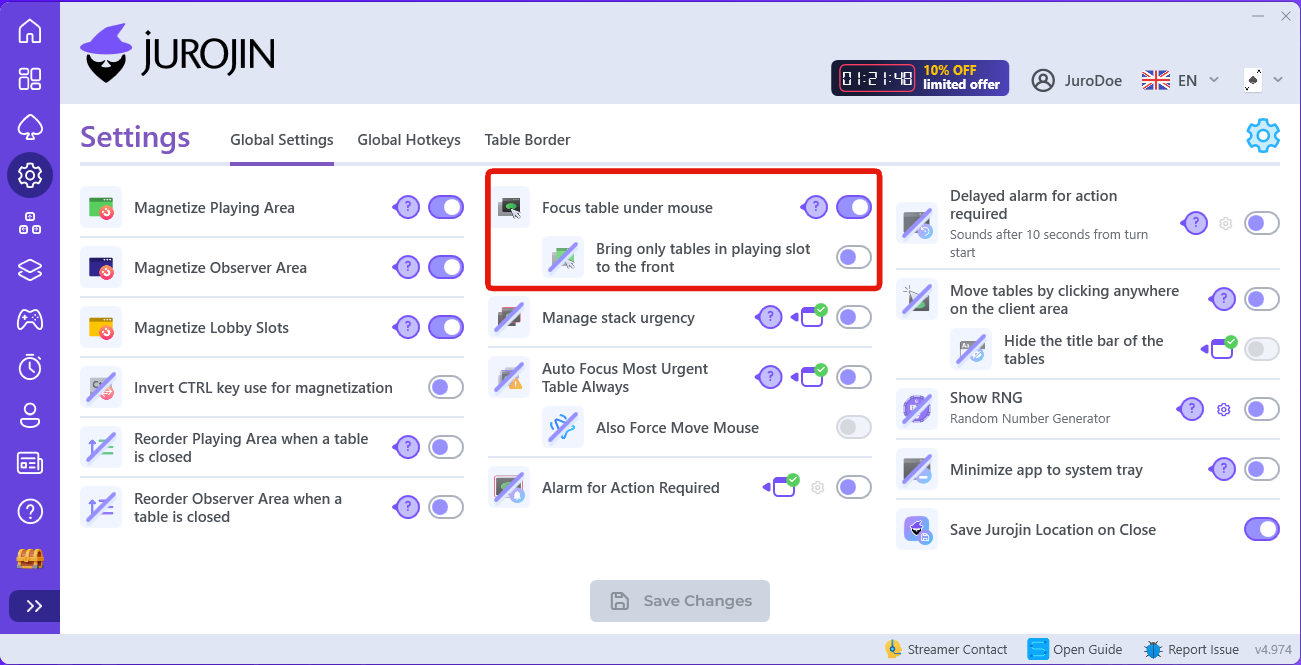
Focus Under Mouse
Navigate your tables with clarity: with Focus Under Mouse, a table gets keyboard focus the moment your cursor is over it, no click required. You just move the mouse and act, which removes an entire layer of friction when jumping between tables.
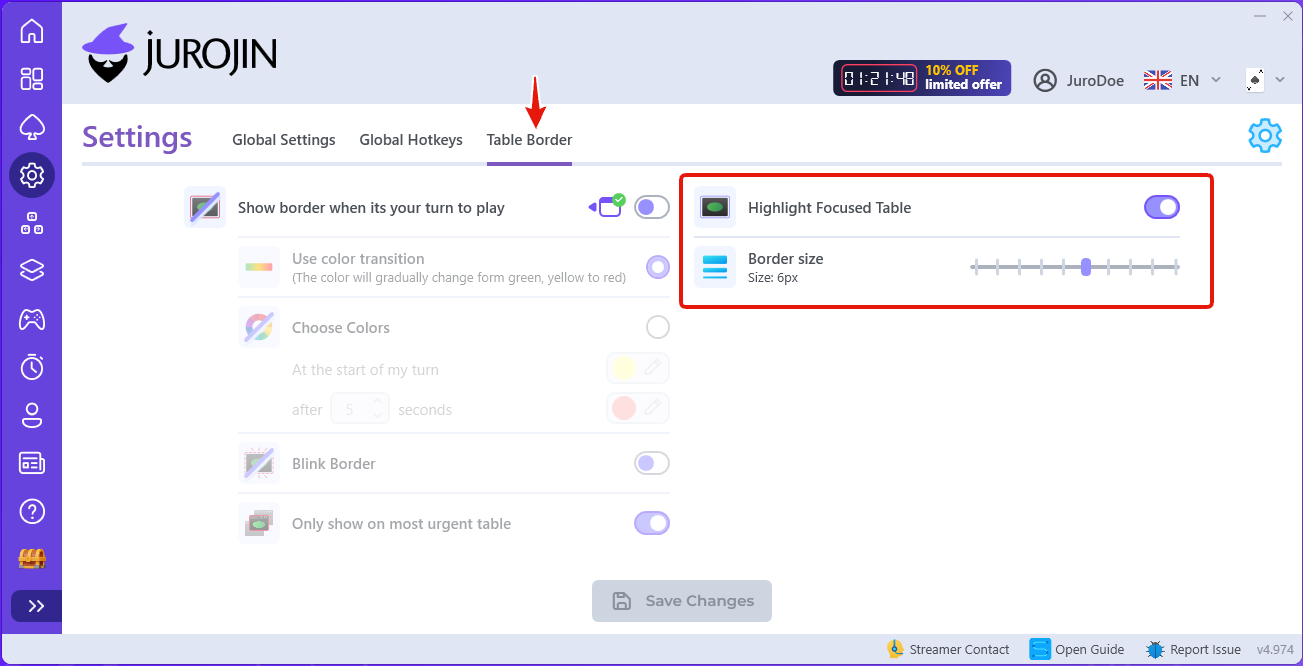
Focus Border
The visual companion to Focus Under Mouse. The Focus Border (violet) highlights the table that currently holds focus, so at a glance you always know which table your keystrokes will land on, no guessing while you glide across your layout.
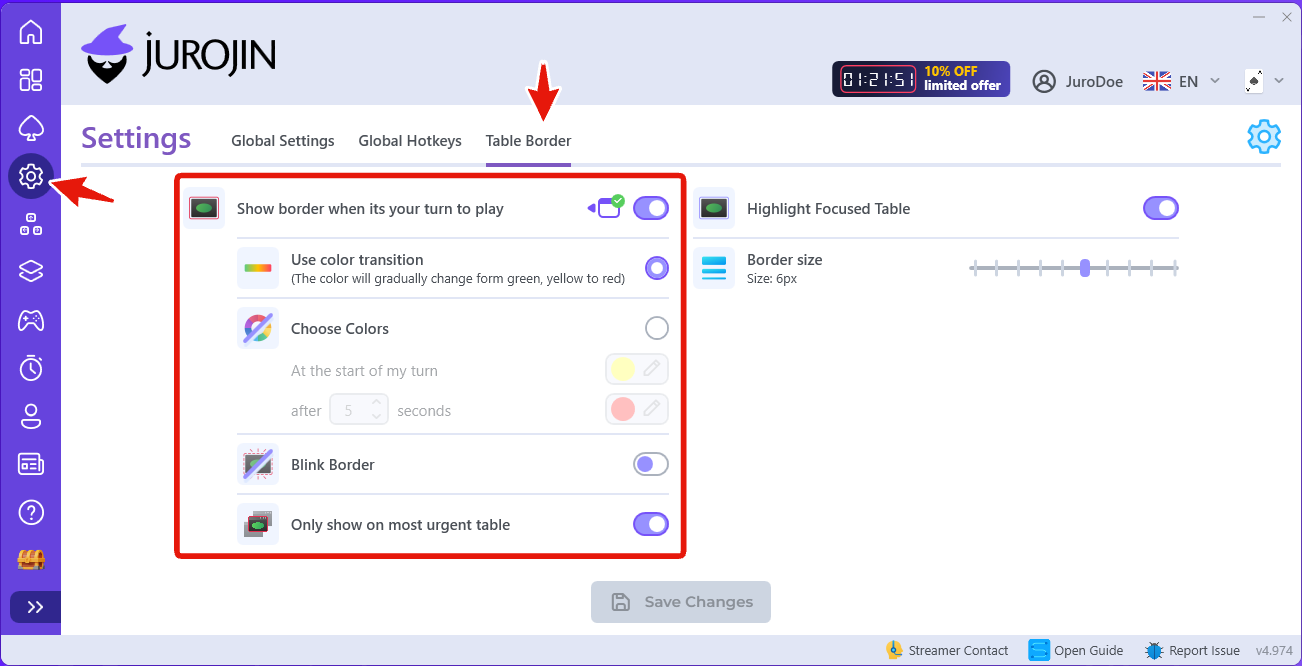
Action Required Border
Now for the tables that need you. The Action Required Border is a color frame around any table where it's your turn to act. You can have it blink or change color as a table becomes more urgent, giving you an instant visual cue of where to look, no reading required.
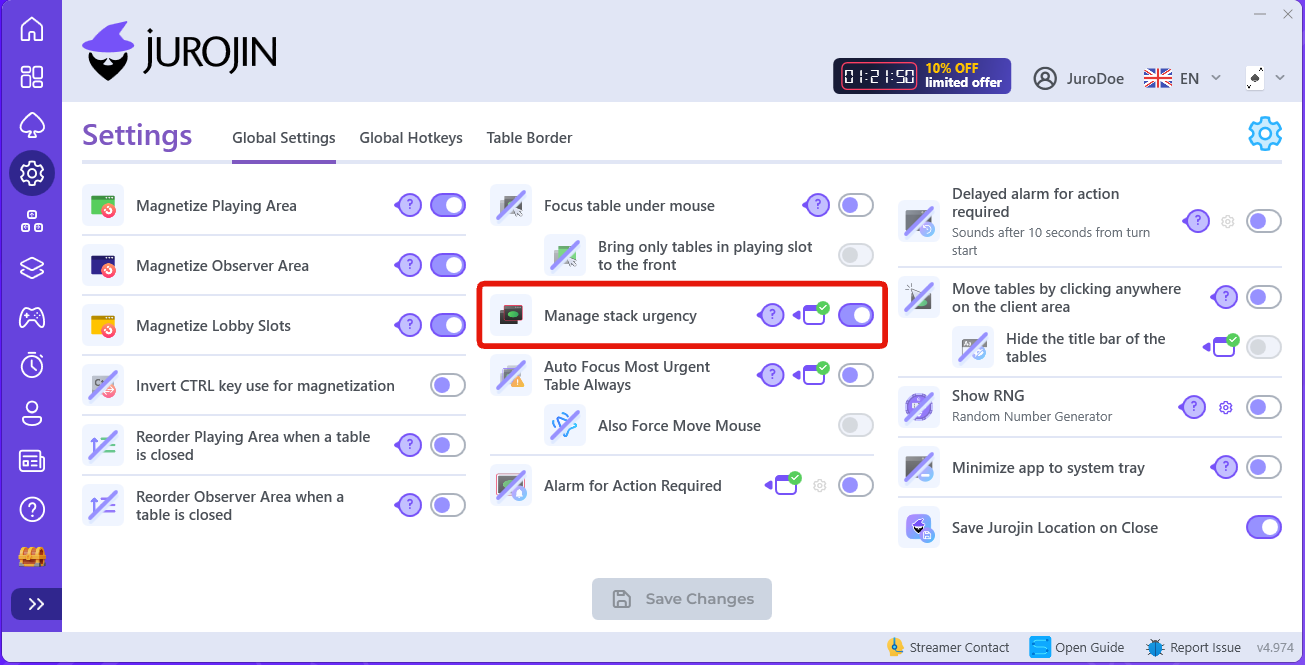
Manage Stack Urgency
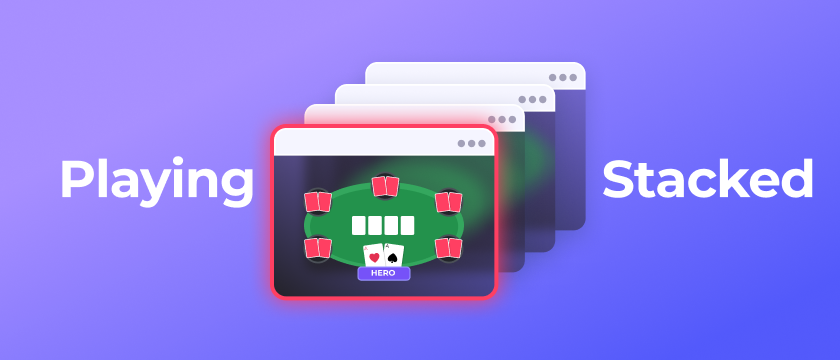
Manage Stack Urgency is specifically designed for players who keep more than one table in the same Slot (a stack). Every time you act on a table, Jurojin automatically brings the next most urgent table to the top of the stack, so the table that needs you is always the one in front of you. This is what lets you play many tables from a single slot without losing track.
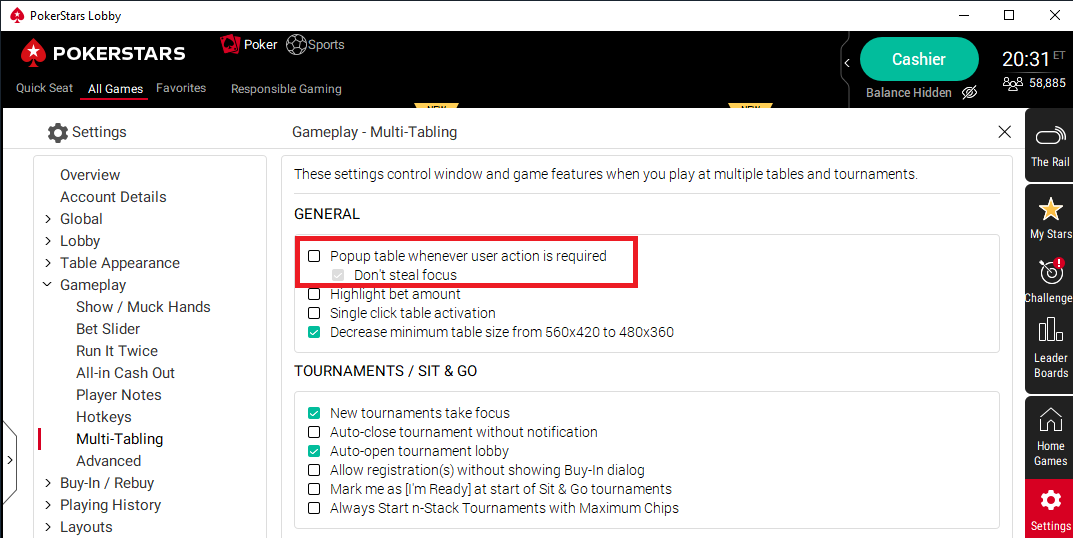
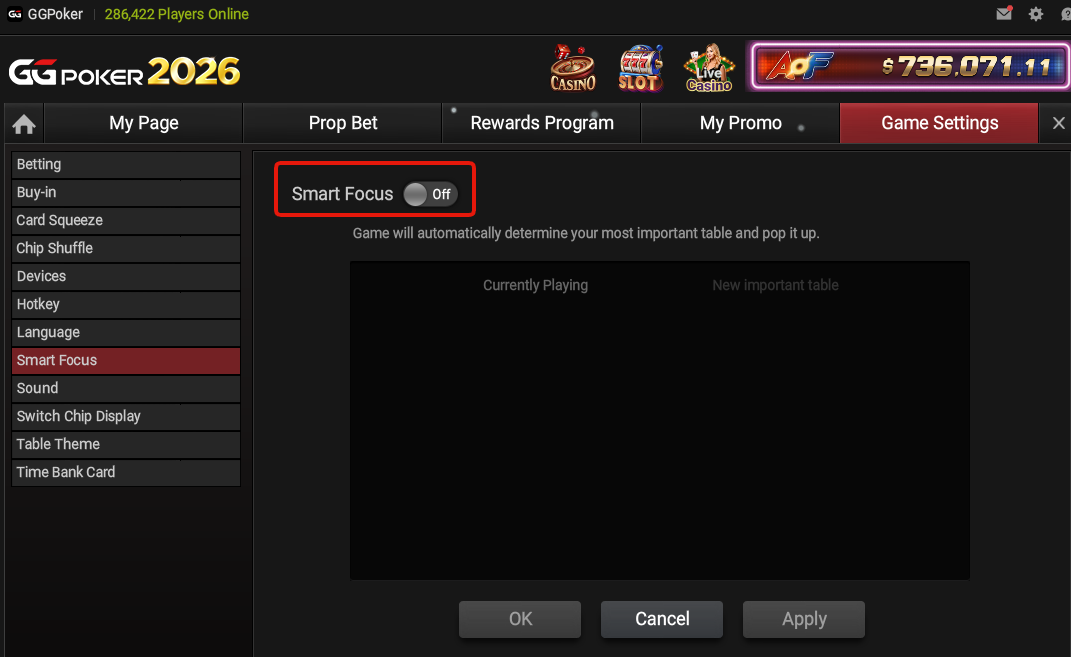
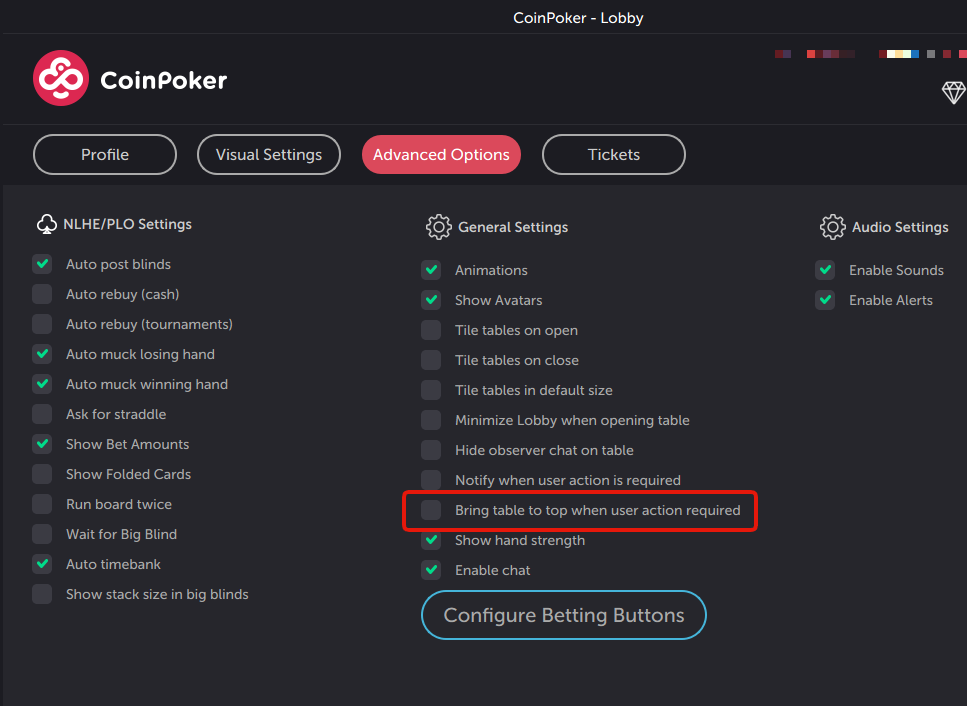
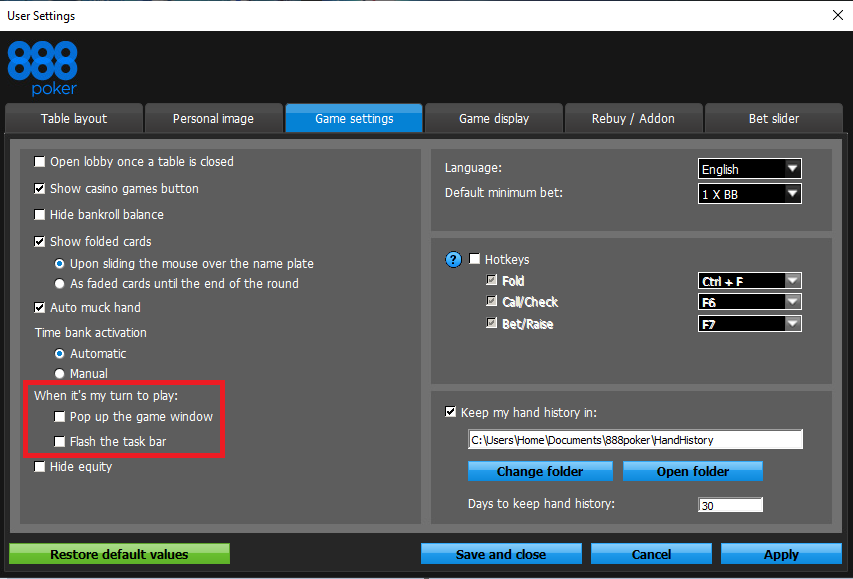
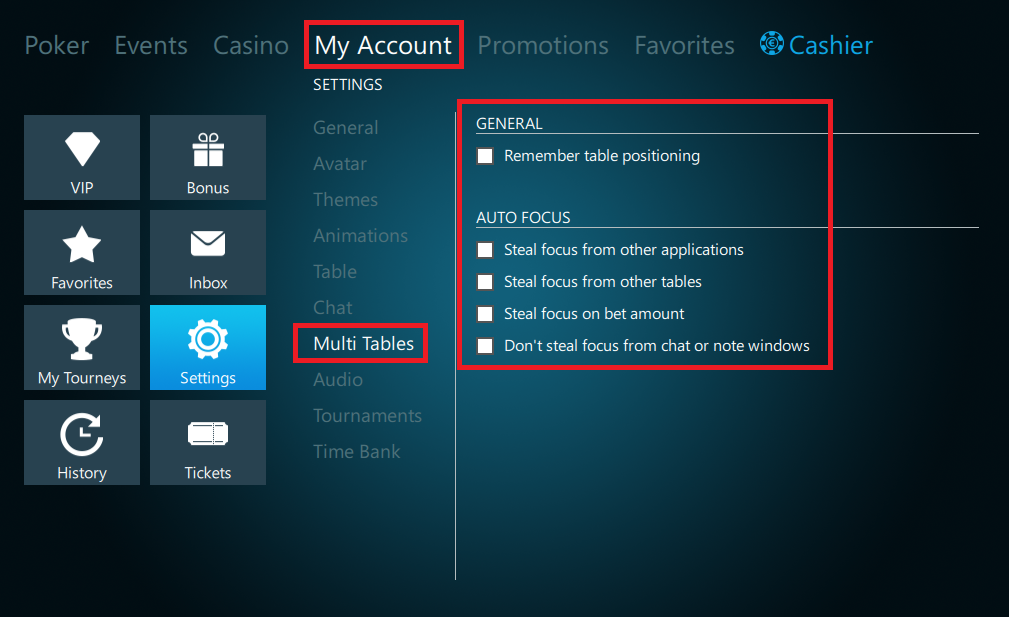
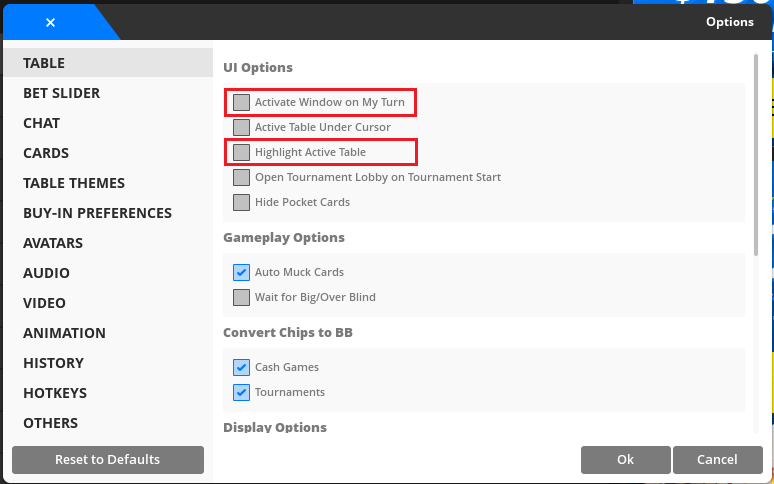
For this to work correctly, turn off the native "Pop Up Tables / Steal Focus" features of each poker site and delegate urgency management to Jurojin.
Auto-Focus (New)
Our newest focus feature, and the ultimate hands-off option. Auto-Focus always keeps your keyboard focus on the most urgent table automatically. It's built for players who want zero distractions and don't need the mouse to play, act with your hotkeys and Jurojin makes sure your keystrokes always land on the right table.
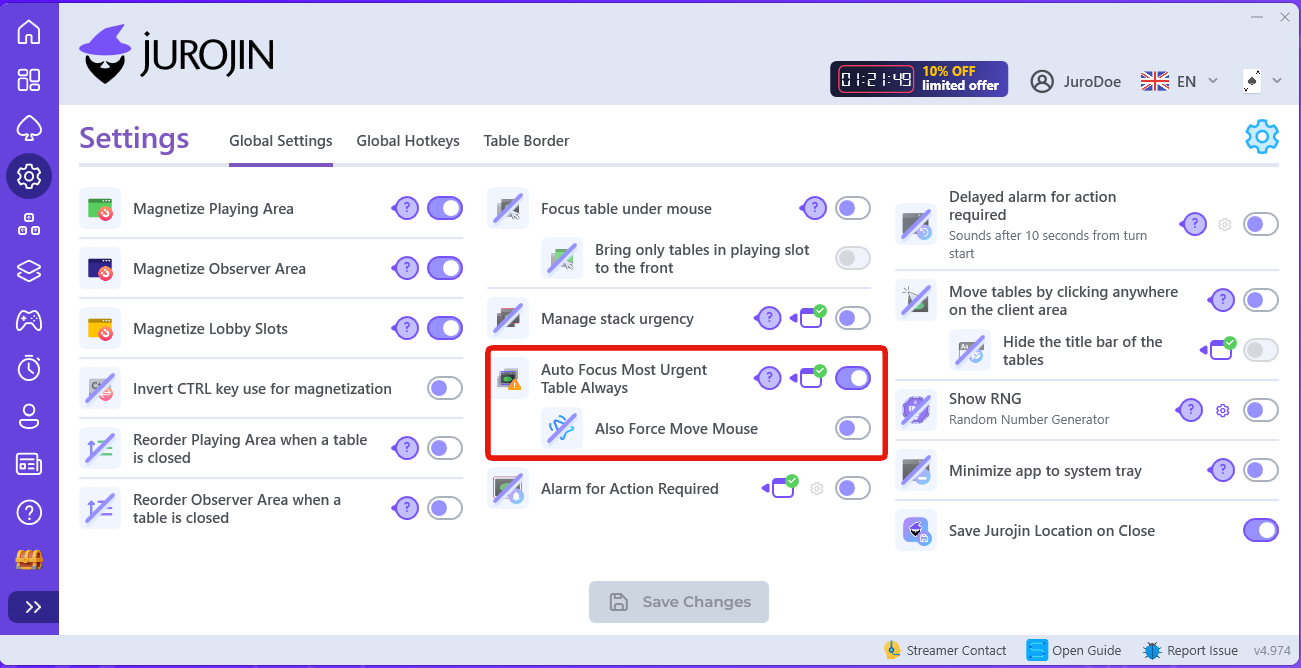
👉Pair Auto-Focus with a Color Border for maximum visual clarity: the software moves your focus for you, and the border confirms it at a glance.
Dedicate Slots to the Tables That Matter
Beyond urgency and borders, Jurojin's Table Manager lets you build tiling dynamics that physically move the important tables to a prime spot on your screen.
Action Required Tiling
Add dedicated Action Required Slots to your layout and Jurojin will automatically move any table that needs action into them, then send it back once you've acted. All your urgent decisions gather in one predictable area of the screen.
In-Hand (VPIP) Slots
Prefer to focus on the hands you're actually involved in? An In-Hand Slot promotes a table to the spotlight the moment you VPIP or the flop shows up, and returns it when the hand is over. A great fit for stacked gameplay when you only want live hands front and center.
Never Lose Track: Counters & Navigation
When you stack a lot of tables, it's easy to lose count of how many are still waiting for you. These tools keep you in control:
- Cycle Through Stack HotKey — instantly rotate through every table in the stack with a dedicated hotkey, useful when a site popup steals focus.
- Action Required Counter — a small HUD showing how many tables currently require action. Clicking it cycles through all pending-action tables, so you can find every decision without hunting.
Delegate Urgency Management to Jurojin
Each poker site has its own urgency/focus behavior. To let Jurojin manage all of it for you, turn off the site's native "Pop Up / Steal Focus" options. Match your configuration to the screenshots below for each network.
PokerStars
GGPoker
CoinPoker
PartyPoker
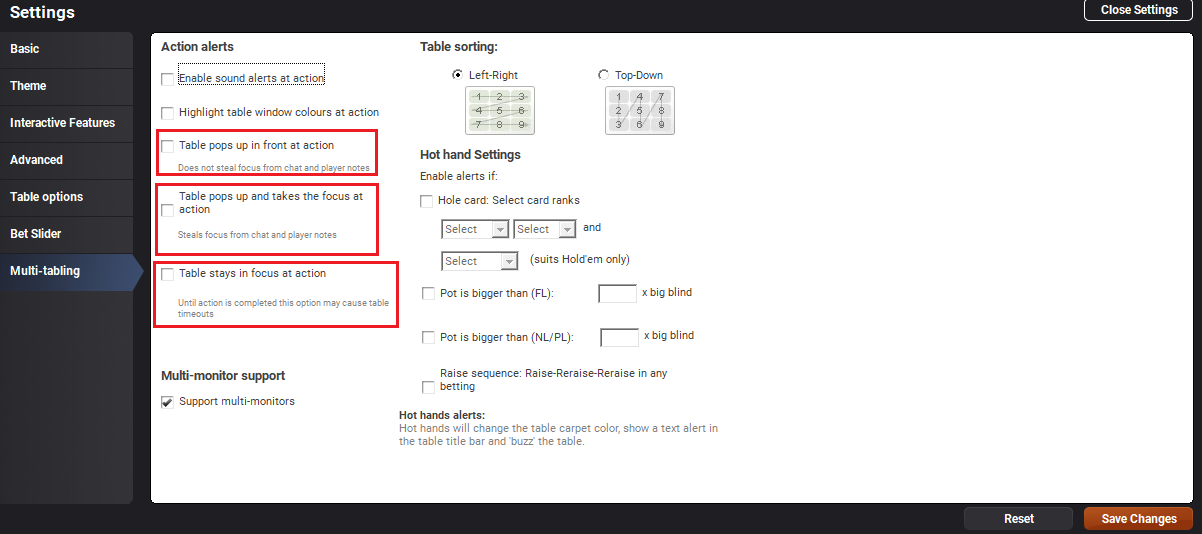
Winamax
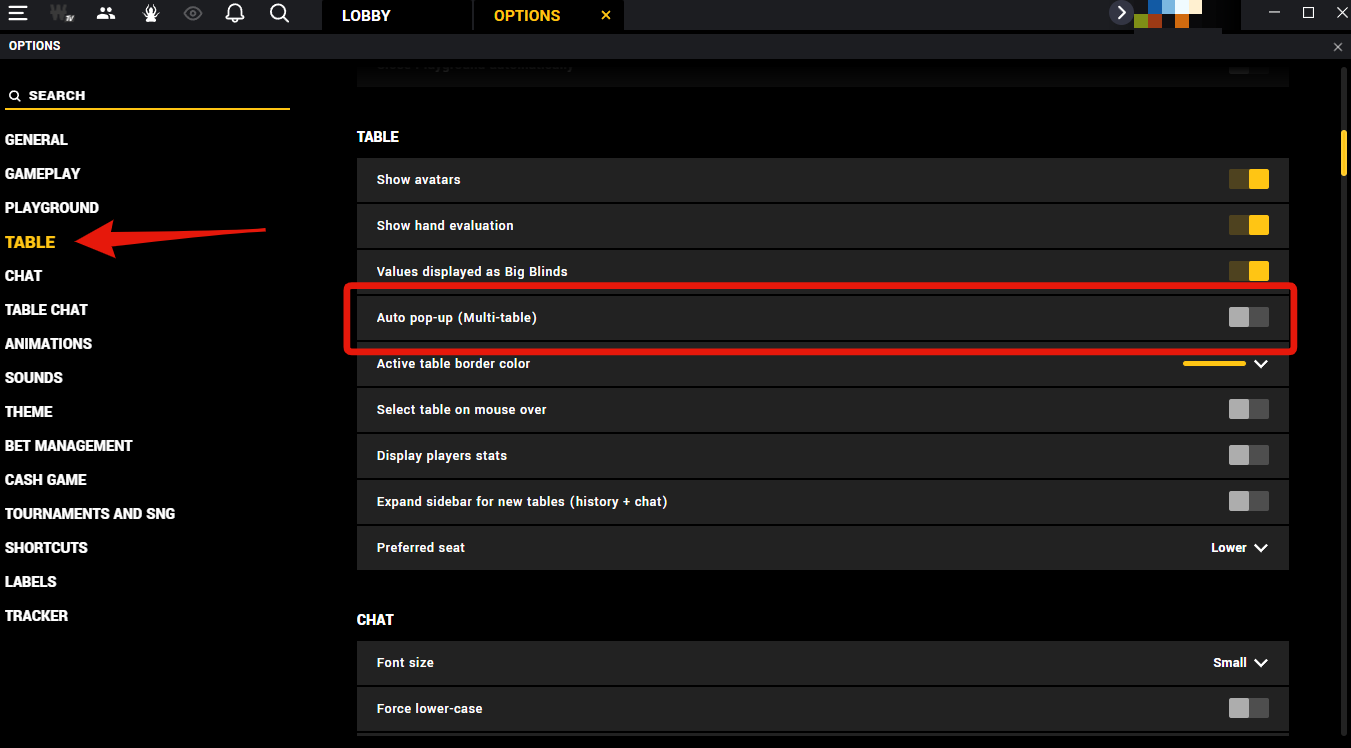
Bovada - Bodog - Ignition
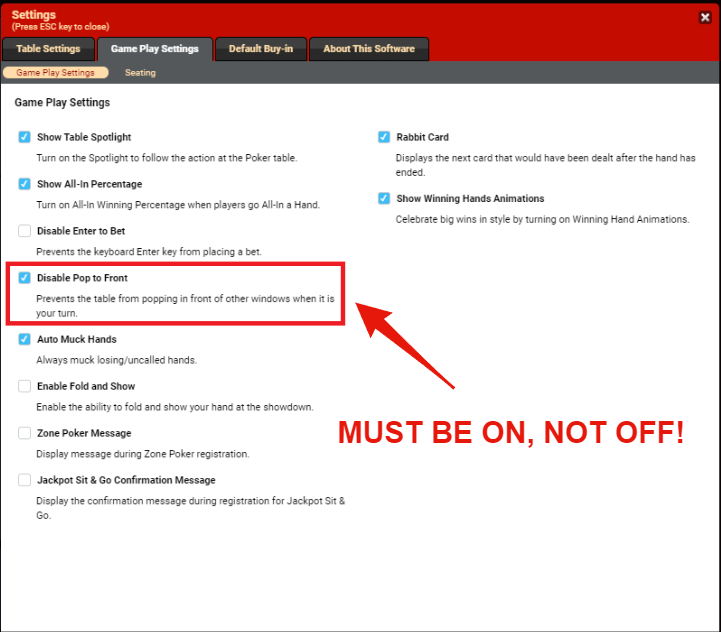
Winning Poker Network
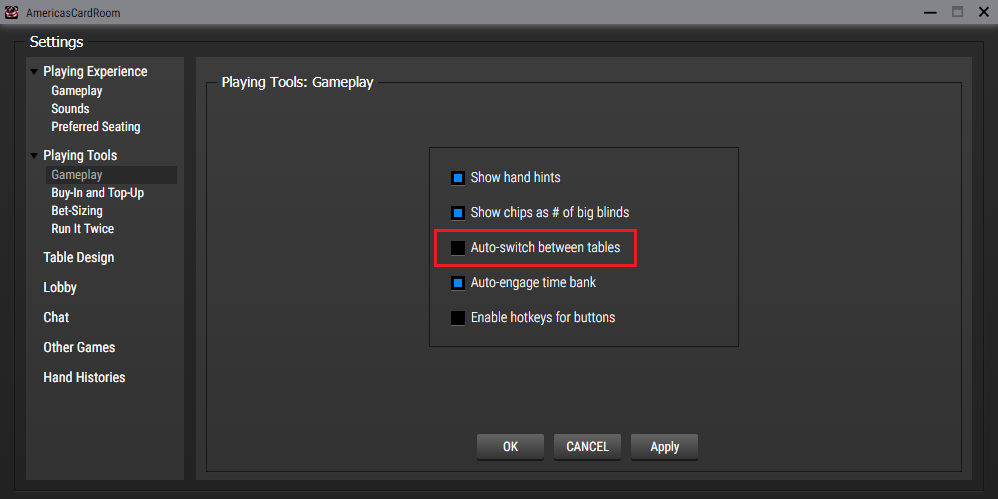
888 Poker
IPoker
ChicoPoker / BetOnline / TigerGaming
Frequently Asked Questions About Focus Management
What is the fastest way to always act on the right table?
If you stack tables in one slot, enable Manage Stack Urgency so the urgent table is always in front, and add Auto-Focus if you play with hotkeys, that combination keeps both your screen and your keyboard pointed at the table that needs you.
What is the difference between Focus Under Mouse and Auto-Focus?
Focus Under Mouse gives focus to whichever table your cursor is over, you're still in control with the mouse. Auto-Focus removes the mouse from the equation entirely and keeps keyboard focus locked to the most urgent table automatically.
Do I still need to change my poker site settings?
Yes. For urgency management to work cleanly, turn off each site's native "Pop Up Tables / Steal Focus" options and match the per-site screenshots in the configuration section above.
Which border should I use for clarity?
Use the Action Required Border to spot tables that need action, and the Focus Border (violet) to see which table currently holds focus. They complement each other, especially alongside Focus Under Mouse or Auto-Focus.
Final Thoughts
Good focus management is part discipline and part setup. Keep the habits, but let Jurojin remove the friction: urgency handled, focus managed, borders guiding your eye, and counters keeping you honest about your volume. That's how you protect your best decisions late into a session.
I have been using this for 4 months and I literally don't think I could play without it now, so so useful for multisiting. Almost all my students are also using it now too, great software and can't recommend enough if you play multiple sites.
PlasticElephant on TwoPlusTwo
Download Jurojin and try it for free to start playing poker like a Pro, now!